Family Premium services
Family Premium offers additional features that make using the platform even more convenient. These services help you stay better informed about your child's studies, grades, attendance, and school-related activities.
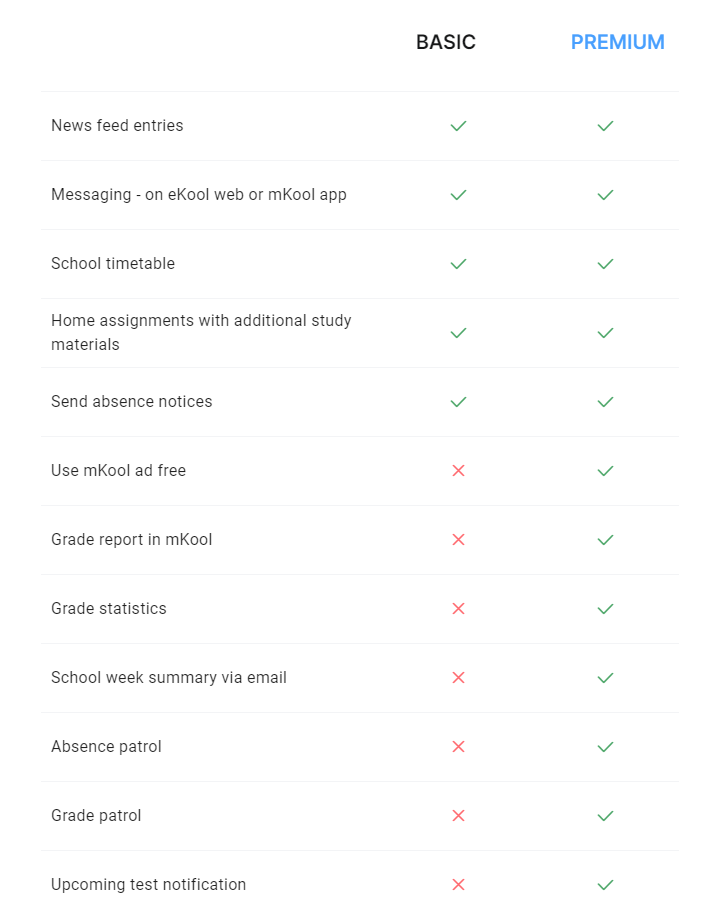
Services
Grade Statistics: Statistics appear both in the newsfeed and on the grades page. You’ll see charts showing grade distribution and averages.
Learning Analytics: School leaders and class teachers can view grade-related insights and statistics for students and class performance.
Weekly Report: A weekly email summary includes key updates such as:
- Absences
- New or changed grades
- Homework and upcoming tests
- Teacher comments and decisions
Absence Patrol: This service notifies you when your child is absent from the first lesson of the day. Notification types: SMS, email, and in-app.
Grade Patrol: You’ll be notified when a new grade is entered or if a grade is missing during the grading period. Notification types: SMS, email, and in-app.
Upcoming Test Notification: This feature alerts you about upcoming tests 1–2 working days in advance. Notification types: SMS, email, and in-app.
Journal in eKool App: Family Premium users can also view grade information directly in the mKool mobile app. Tap on a subject to see detailed grade entries.
Related articles
-
Cancelling Family Premium subscription
This article contains instructions how to end your Family Premium subscription
-
Family Premium
The article explains how the Family Premium works, its benefits and the choice of people involved.
-
Subscription to Family Premium trial
Instructions on how to start and end a trial of the Family Premium
Thank you for your feedback!
Thank you about your feedback/question, we will answer to you asap via your e-mail.
-
- Creating a new conversation
- Managing Conversations and Participants
- Sending and Managing Messages
- Polls in eKool Messaging
- Messaging User settings
- Who can you start a new conversation with (according to your role in eKool)
- Start a Conversations - Choosing Groups
- Understanding Group and User Indicators in eKool Messaging
- Participating in a conversation
- Formatting Messages in eKool
- Conversation access to school admin - sharing link
-
- New location for Consent Management and School Cards
- Recovering eKool's account password
- eKool API
- Resolving Login Issues (Mobile-ID, Smart-ID, ID Card)
- How to reset your eKool password
- Getting an overview of grades after leaving school
- Changing Your Email (username): “Email is Already in Use”
- I can't see my child's/my own study information in eKool?
- Incorrectly sent absence notice
- How to Recover Your Account When You Can't Access Your Email
- Removing a parent's access to their child's educational information
- Troubleshooting Mobile App Crashes
- The school cannot be found in the eKool school list
- What should I do if someone else has logged into eKool account and made entries?
- Can't Find Your 2FA Code in Email?
- How to add a username to your Opiq account connected to eKool?
- Login Error: “reCAPTCHA verification failed”
- Troubleshooting Chrome Display Issues in eKool Messaging